Installment plans allow learners to pay for a product in multiple parts instead of a single upfront payment, making courses more accessible and affordable.
Steps to Create an Installment Plan
Go to Store from the main menu
Click on the product for which you want to enable installments
Click More
Select Installment Plan
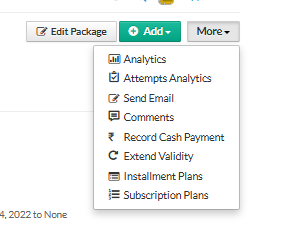
Click Create Installment Plan
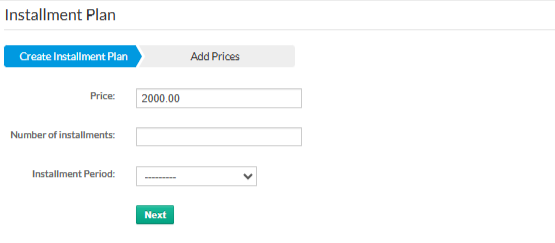
Installment Plan Details
Refer to the screen shown above and fill in the following fields:
Price
Enter the total price of the product to be paid via installments.Number of Installments
Specify how many parts the total amount should be split into.Installment Period
Choose the time gap between each installment (for example, monthly).Click Next to add installment-wise pricing details
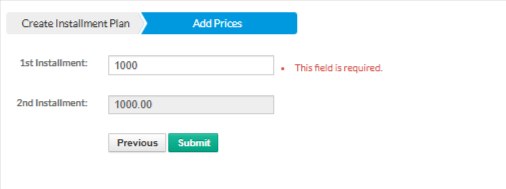
Review the breakup and confirm the plan
Once created, learners will see the installment option during checkout and can complete payments as per the defined schedule.
Was this article helpful?
That’s Great!
Thank you for your feedback
Sorry! We couldn't be helpful
Thank you for your feedback
Feedback sent
We appreciate your effort and will try to fix the article