This feature allows admins to export the entire question bank from Testpress for offline access, backup, or review. You can download questions in multiple formats, making it easy to share with faculty, audit content, or maintain records.
How to Download the Question Bank
Log in to your Testpress Admin Dashboard.
Navigate to Questions from the top menu.

Click on the Export button available at the top-right corner.

Choose the required export format.
The question bank will be downloaded in the selected format.
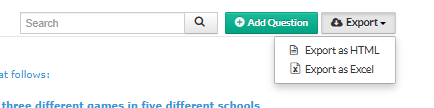
Available Export Formats
HTML Format
Allows easy viewing of questions in a browser-friendly format.Excel Format
Useful for editing, reviewing, or maintaining question records in spreadsheet form.
Why Use Question Bank Export?
Maintain a backup of all questions
Review or audit question quality offline
Share questions with faculty or subject experts
Reuse questions across platforms or courses
Was this article helpful?
That’s Great!
Thank you for your feedback
Sorry! We couldn't be helpful
Thank you for your feedback
Feedback sent
We appreciate your effort and will try to fix the article