This section helps you export a list of active users from your Testpress LMS. Active user reports allow you to understand learner engagement over a specific time period and help with audits, reporting, and follow-ups.
A user is considered active if they have attempted at least one exam or accessed any video, attachment, or content during the selected time range. This includes users who may have been deleted later.
How to Export Active Users
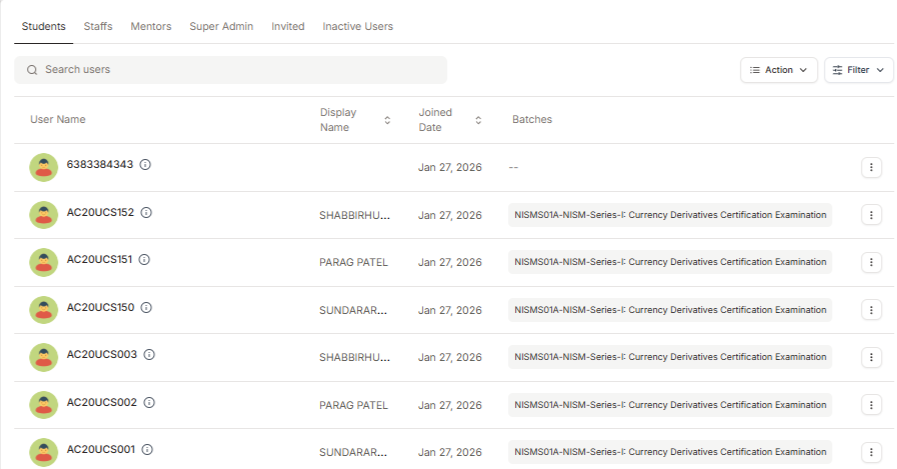
Log in to your Testpress Admin Dashboard, Navigate to Members.
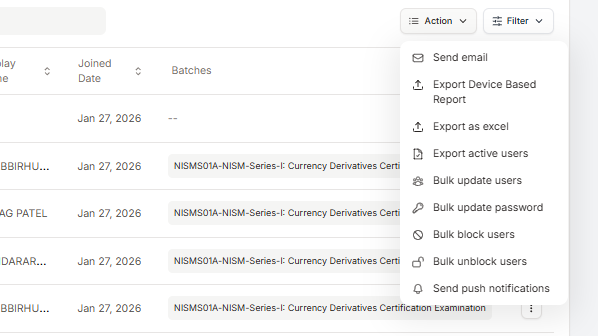
Click on the Action dropdown at the top-right corner and select Export Active Users.
In the export window:
Choose the From date and time
Choose the To date and time
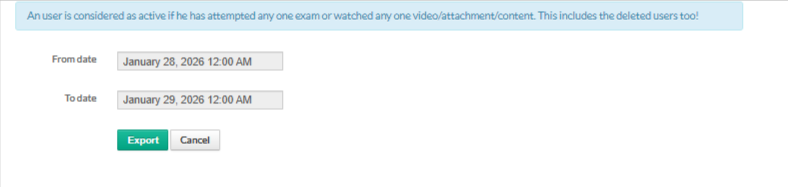
Click Export.
Once requested, the report will be generated in the background and sent to the registered admin email ID associated with your Testpress account.
Was this article helpful?
That’s Great!
Thank you for your feedback
Sorry! We couldn't be helpful
Thank you for your feedback
Feedback sent
We appreciate your effort and will try to fix the article