This section helps you understand your sales performance. You can view all transactions, track total earnings, filter sales by product or time period, and export detailed reports for analysis.
How to View Sales Reports
Step 1: Navigate to Settings
Log in to your dashboard and go to Settings, In the Settings menu, click Sales to view all transactions and total earnings.
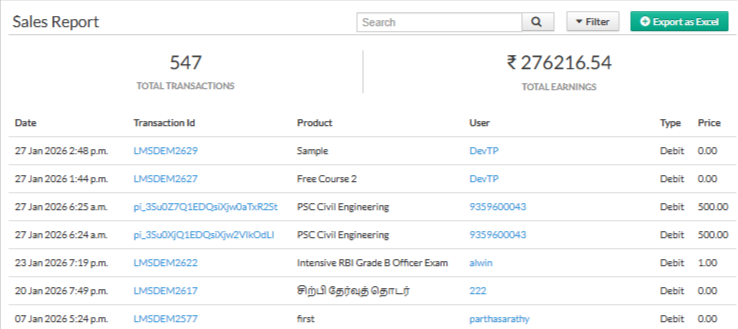
Step 3: Filter Your Sales Data
Use the available filters to refine your report:
Product – Select a specific product to see its sales.
Duration – Choose a time range to view transactions for that period.
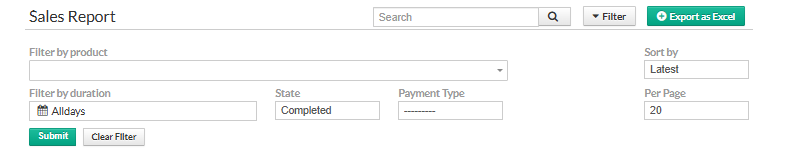
Step 4: Export the Report
Once you’ve applied the filters, click Export to download the sales report as an Excel file.
The exported report helps you analyze sales performance offline or share it with your team for better business decisions.
Why Use Sales Report Analytics?
Identify top-selling products and trends
Track overall earnings and sales performance
Analyze sales data for specific periods
Make informed business and inventory decisions
Was this article helpful?
That’s Great!
Thank you for your feedback
Sorry! We couldn't be helpful
Thank you for your feedback
Feedback sent
We appreciate your effort and will try to fix the article