This section helps you understand how learners are engaging with your courses. You can view overall course performance, track individual learner activity, and export detailed reports for analysis.
How to View Course Performance Analytics
Step 1: Navigate to the Course
Log in to your Testpress Admin Dashboard, Go to Courses

Step 2: Click on Learners Count
In the course overview page, click on the Learners count
This opens the Overall Enrolled Students view

Step 3: View Overall Learner Activity
The learner list shows engagement across different content types such as:
Exams
Quiz Exams
Videos
Live StreamsAttachments
Notes
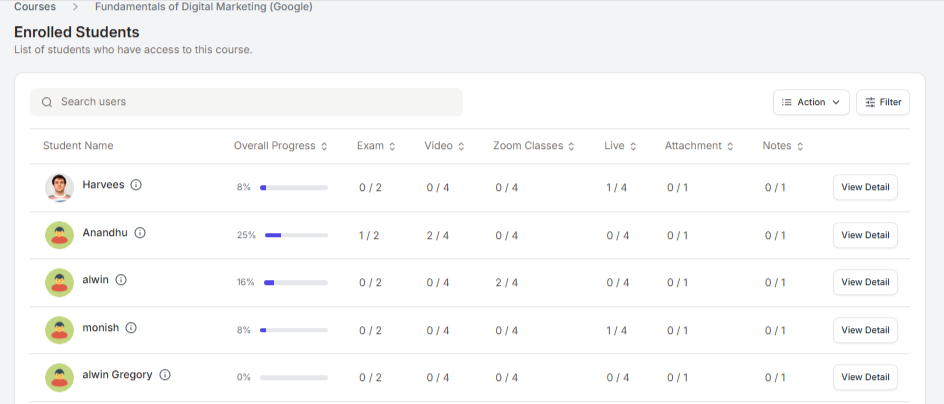
This gives you a quick snapshot of how actively each learner is using the course.
Step 4: View Individual Learner Details
Click on View Detail for a specific learner

You can now see the learner’s detailed performance like Total exams attempted, quiz attempted, videos watched etc.
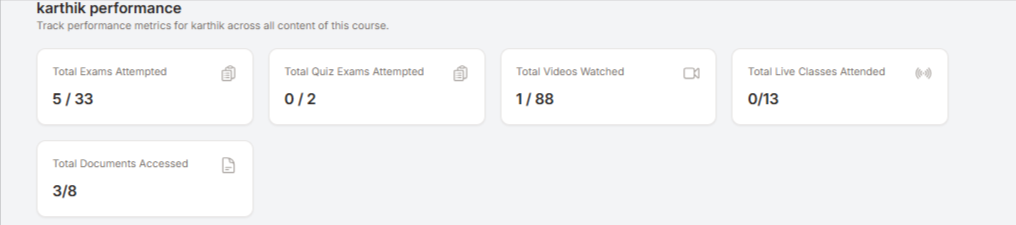
It also provides a complete view of a learner’s activity within a course, including exams, quizzes, videos, live sessions, and other learning content.
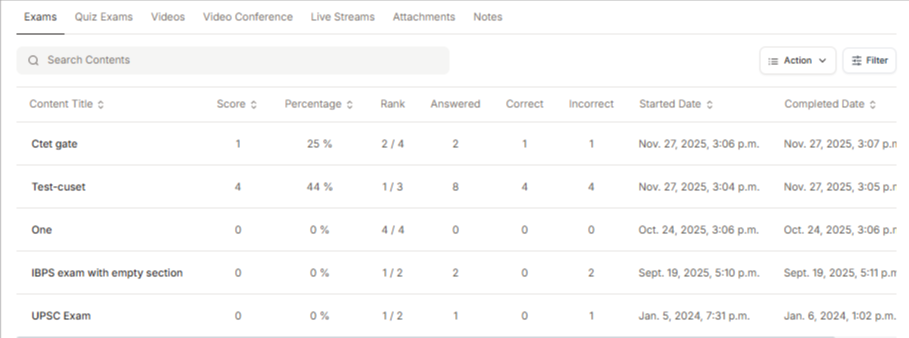
Step 5: Export Individual Performance Reports
From the individual learner view, you can export the performance report
The exported report helps you analyze learner progress offline or share it with internal teams

Note: Exported reports will be sent to the registered admin email ID.
Why Use Course Performance Analytics?
Identify highly engaged and low-engagement learners
Measure course effectiveness
Track learning outcomes at an individual level
Make data-driven improvements to course structure and content
Was this article helpful?
That’s Great!
Thank you for your feedback
Sorry! We couldn't be helpful
Thank you for your feedback
Feedback sent
We appreciate your effort and will try to fix the article