Now that your portal is organized and your members are in place, it’s time to start building your course. This guide will walk you through creating a course, adding chapters, uploading learning materials, and setting up access rules—everything you need to launch your content on Testpress.
Step 1: Create a Course
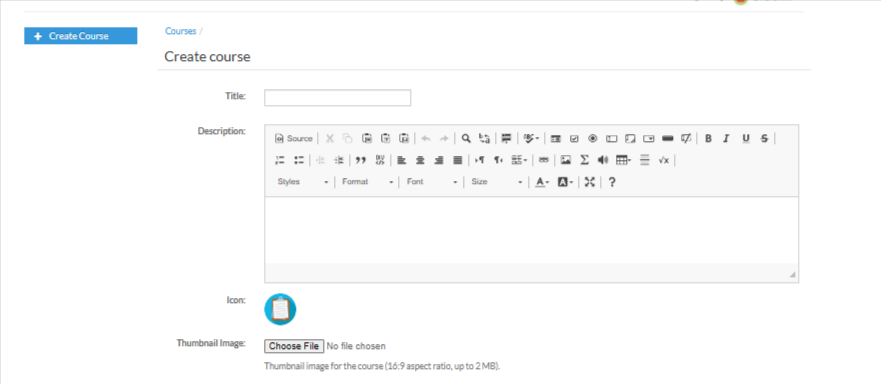
Start by entering the basic details of your course.
Add the title, write a description, upload a thumbnail image, and set the initial course icon.
This forms the foundation your learners will see first.
Step 2: Add Chapters
Once the course is created, you can begin structuring your content. Use the Add Chapter option to divide your course into organized sections.
Chapters help students navigate your lessons with clarity.

Step 3: Add Learning Content
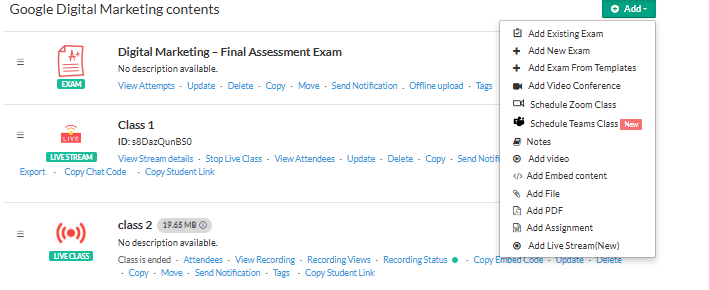
Inside each chapter, you can add a variety of learning materials—videos, live classes, PDFs, files, exams, assignments, notes, embeds, and more.
This lets you build a rich, engaging learning experience tailored to your teaching style.
Step 4: Control Course Access
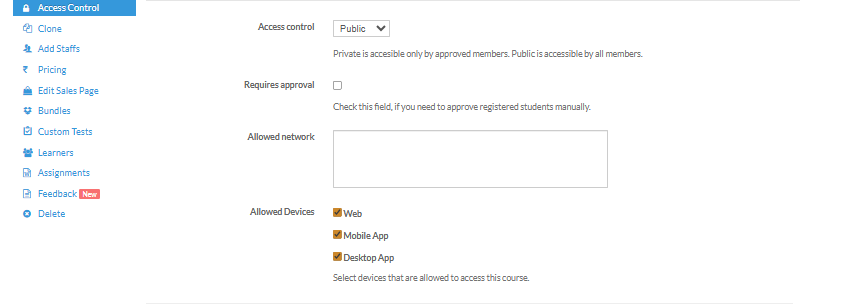
Finally, configure who can access your course.
Choose between Public (visible to all members) or Private (restricted).
You can assign the course to specific batches based on your training needs.
You're All Set!
Well done! You’ve successfully created your first course in Testpress.
You can now continue adding content, refining chapters, or publishing the course to your learners
Was this article helpful?
That’s Great!
Thank you for your feedback
Sorry! We couldn't be helpful
Thank you for your feedback
Feedback sent
We appreciate your effort and will try to fix the article